
“I want to switch from my current mobile carrier to Rakuten Mobile, but the process seems troublesome…”
“I hear about MNP One-Stop, but is it really that easy?”
Good news for you if you have such questions or concerns!
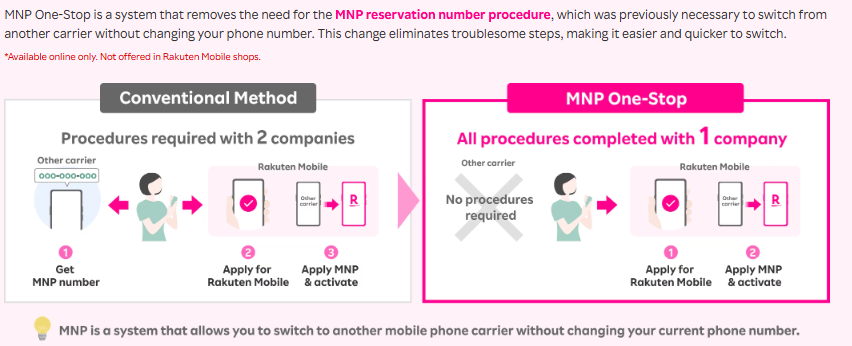
By using the MNP One-Stop method, switching to Rakuten Mobile is surprisingly easy. The troublesome procedures of the past are no longer necessary.
This time, we will clearly explain how to switch to Rakuten Mobile using MNP One-Stop in just 3 simple steps.
What is MNP One-Stop?
Switching to Rakuten Mobile! Completed in Just 3 Steps
By using MNP One-Stop, switching to Rakuten Mobile can be completed in just these 3 steps:
Step 1: Apply with Rakuten Mobile
First, access the Rakuten Mobile official website, select your plan, and start the application process.
At this time, select “Switch from another carrier (keep your phone number)” and choose “Apply with MNP One-Stop”.
Follow the on-screen instructions to upload identity verification documents, enter payment information, and so on.
For MNP One-Stop, there will be a field to enter information about your current mobile carrier, so please enter it accurately.
Step 2: Line Switching Procedure
Once your application is complete and your SIM card (or eSIM setup information) arrives, proceed with the line switching procedure.
Log in to Rakuten Mobile’s Members Station (website or app) and follow the steps under “MNP Activation Procedure.”
By performing this procedure, the line of your original mobile carrier will automatically be stopped, and it will switch to Rakuten Mobile’s line.
The procedure takes only a few minutes, and the line usually switches within approximately 15 minutes to 1 hour. (In some cases, it may take several hours.)
Step 3: APN Settings and Call Test
Once the line switching is complete, configure the APN (Access Point Name) settings on your smartphone.
Please follow the instructions sent by Rakuten Mobile or the guide on their official website. In most smartphones, this is often set automatically, but it’s a good idea to check just in case.
After the settings are complete, make a test call and connect to the internet to confirm that everything is working correctly.
With this, your switch to Rakuten Mobile is completely finished!
Benefits of Switching to Rakuten Mobile with MNP One-Stop
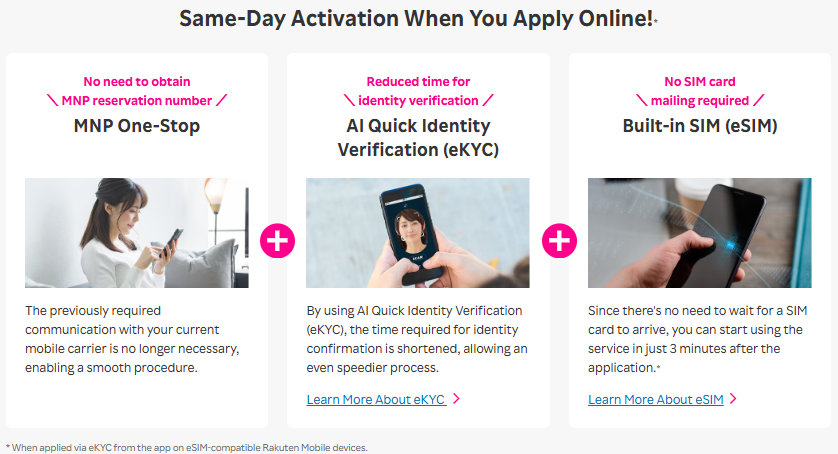
- Significantly Simplified Procedure: No need to obtain an MNP reservation number, drastically reducing the time and effort required for switching.
- Smooth Transition: The absence of communication with your previous carrier lightens the mental burden.
- Possible to Start Using on the Same Day: If you use eSIM, the line switching can be completed in minutes after application, allowing you to start using Rakuten Mobile’s services immediately.
Summary
With the introduction of the MNP One-Stop method, switching to Rakuten Mobile has truly become “super easy.”
Even those who hesitated to switch due to “troublesome procedures…” can now start a comfortable Rakuten Mobile life in just 3 steps.
Why not consider switching to Rakuten Mobile, which offers unlimited data and unlimited calls, at this opportunity?
Please check the Rakuten Mobile official website for detailed procedures and the latest campaign information.
Related Articles

Comprehensive Guide on Rakuten Mobile’s Contract Period and Cancellation Fees

How to Cancel Your Rakuten Membership: A Simple Step-by-Step Guide

Rakuten Mobile eSIM Guide | Comprehensive Explanation of Setup, Benefits, and Compatible Devices

Easy for Everyone! How to Cancel Rakuten Mobile

How to Switch from Physical SIM to eSIM for Free