With Rakuten Mobile, you can use Rakuten Points to pay your monthly mobile bill. It’s a convenient way to make good use of your Rakuten Points and reduce your monthly phone expenses.
However, you may sometimes find that your point payment was not applied, even though you set it up or had enough points.
In this article, we’ll briefly explain how to set up point payments in 2026 and what to check if your Rakuten Points are not applied.
Rakuten Mobile Point Payments Help You Use Limited-Time Points
When you use Rakuten Points to pay your Rakuten Mobile bill, they are used in the following order:
・Limited-time points
・Regular points
・Rakuten Pay balance
One useful feature is that limited-time points are used first. By setting your Rakuten Points to pay your monthly mobile bill, you can reduce the chance of forgetting to use limited-time points before they expire.
However, be sure to check the expiration date of your limited-time points.
If your limited-time points have already expired when your bill is processed (around the 11th–13th of each month), they will expire and cannot be used for payment. Even if you had enough points when you set up point payments, you may not have enough by the time your bill is processed, and the number of points you expected may not be applied.
To avoid finding that your points were not applied, regularly check your point balance and the expiration dates of your limited-time points.
>>Check your point balance and expiration dates on Rakuten PointClub
【2026】How to Set Up Point Payments in Rakuten Link
Previously, point payments were set up through the “my Rakuten Mobile” app, but they are now managed through the Rakuten Link app.
The screens have also changed, so let’s look at how to set up point payments using Rakuten Link in 2026.
1.Open the Rakuten Link App
Open the Rakuten Link app and tap “my RakuMoba” in the menu at the bottom of the screen.

2.Select “Manage”
Tap “Manage” in the menu at the bottom of the screen.

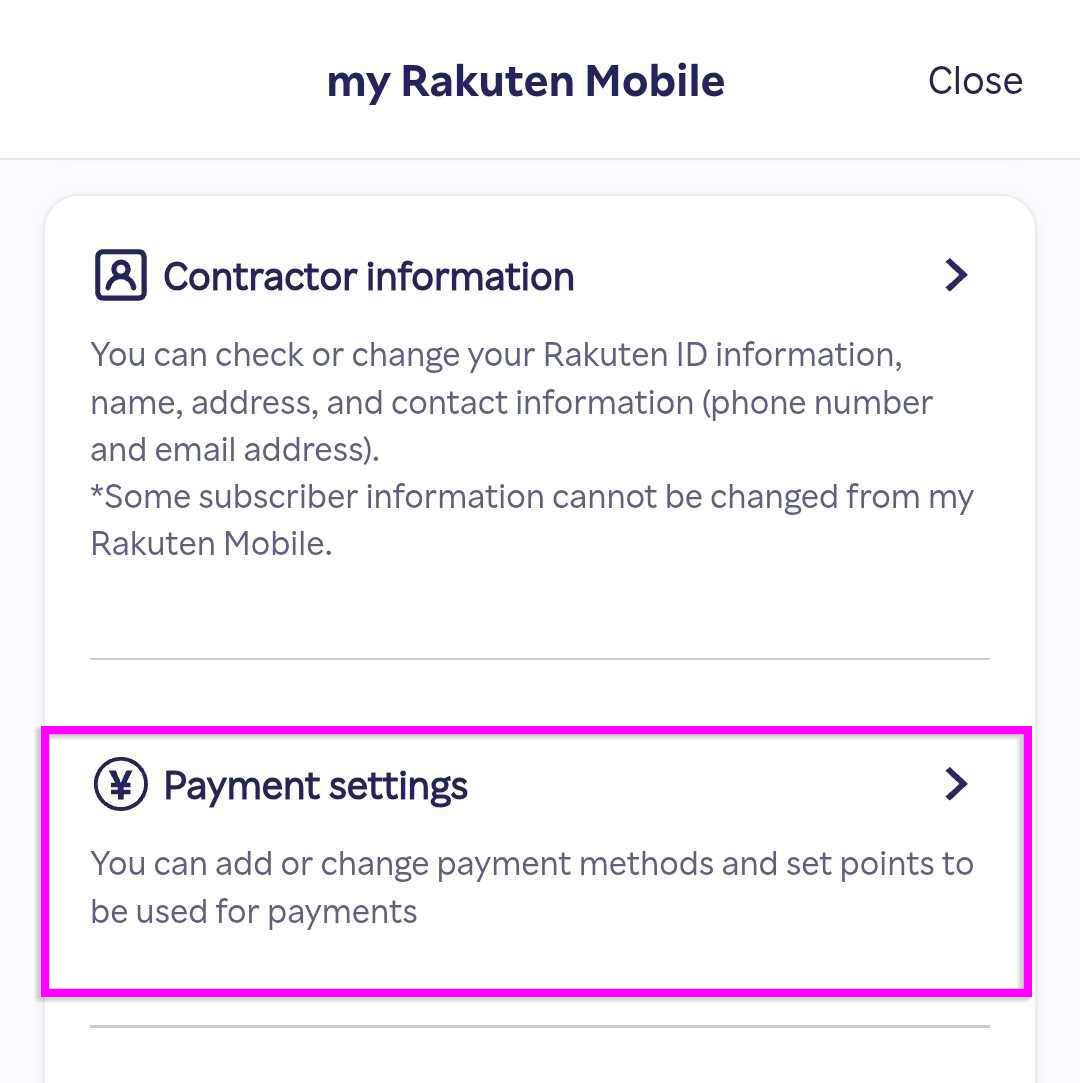
3.Select “Payment Settings”
Tap “Payment Settings” under “Manage.”
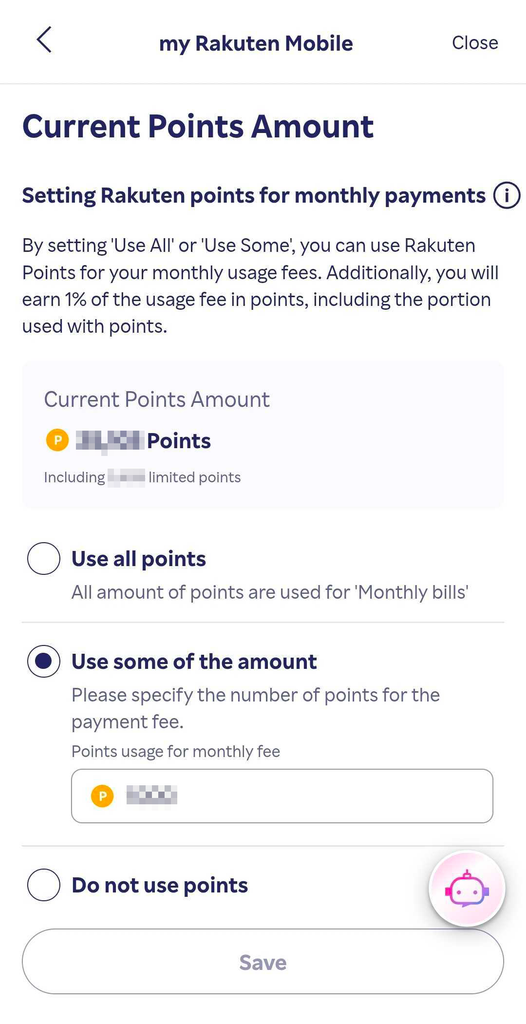
4.Change Your Rakuten Point Settings
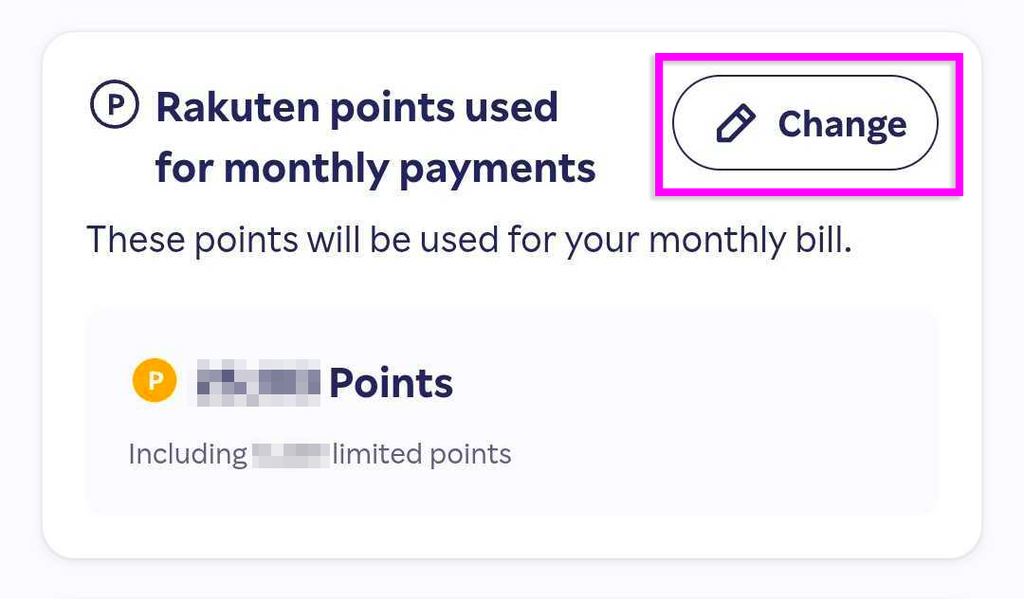
Under “AUTOPAYMENT,” find “Rakuten points used for monthly payments” and tap “Change” in the upper-right corner.
5.Choose How Many Points to Use
Select one of the following options:
・Use all points
・Use some of the amount
If you select “Use some of the amount,” enter the number of points you want to use and tap “Save” to complete the setup. The number of points you set will be applied to the following month’s bill.
Rakuten Mobile Point Payment Not Applied? Common Causes
If you set up point payments but your points were not used, it does not necessarily mean there is a problem. Check the following first.
◆You just set up point payments
The points you set will be applied to the following month’s bill. They will not be immediately applied to your current month’s bill.
◆Your limited-time points have expired
Limited-time points cannot be used if they have expired by the time your bill is processed (around the 11th–13th of each month). Even if you had points when you set up point payments, they may have expired before your bill was processed. Check your current point balance and expiration dates.
◆You do not have enough points when your bill is processed
If you use your points on Rakuten Ichiba or other services after setting up point payments, you may no longer have the number of points you selected when your bill is processed. If you use Rakuten Points for other Rakuten services, be sure to check your current balance.
◆Your credit or debit card information is not valid
If your registered credit or debit card information is not valid, you cannot use Rakuten Points for payment even if you have enough points. Check your registered payment information, including your card’s expiration date.
◆Your Rakuten ID (Rakuten Point account) is not registered
You cannot use Rakuten Points if your Rakuten ID (Rakuten Point account) is not registered with Rakuten Mobile.
◆You have exceeded the point usage limit
There are limits on the number of Rakuten Points you can use per transaction and per month.
・Regular members: 30,000 points per transaction / 100,000 points per month
・Diamond members: 500,000 points per transaction / 500,000 points per month
The monthly limit also includes points used on other Rakuten services, such as Rakuten Ichiba.
※Points used on some Rakuten services may not count toward the monthly limit.
◆You received a convenience store payment slip
If your credit or debit card payment cannot be processed and you receive a convenience store payment slip (postcard), Rakuten Points cannot be used to pay with the slip.
Important Notes When Using Point Payments
Keep the following points in mind when using Rakuten Points for payment.
・You can change the number of points you want to use during the month.
・Once the month ends, you cannot change or cancel the number of points to be applied to the following month’s bill.
・You must set up a payment method even if you pay the full cost of a device with points.
・If you do not have enough points when the points are applied, your registered credit or debit card will be charged.
・If you have a Rakuten Pay balance and the payment amount exceeds your available points or point usage limit, your Rakuten Pay balance will be used.
Rakuten Mobile point payments are also a convenient way to avoid letting limited-time points go unused.
Check your point balance, expiration dates, and settings regularly to make the most of your Rakuten Points!
Related Articles

Comprehensive Guide on Rakuten Mobile’s Contract Period and Cancellation Fees

How to Cancel Your Rakuten Membership: A Simple Step-by-Step Guide

Rakuten Mobile eSIM Guide | Comprehensive Explanation of Setup, Benefits, and Compatible Devices

Easy for Everyone! How to Cancel Rakuten Mobile

How to Switch from Physical SIM to eSIM for Free