
Smartphone plans can be frustrating: “There are too many options to choose from,” or “I’m worried about how much I’ll be billed this month.” One of Rakuten Mobile’s biggest strengths is how simple its pricing and usage concept is, making it easier to avoid the usual “decision points” that cause confusion. In this article, we’ll steer clear of jargon as much as possible and clearly organize the key points of its pricing plan that directly contribute to that ease of understanding. (Prices and terms may change; please check the official website for the latest information.)
Built around one main plan, with pricing based on how you use it
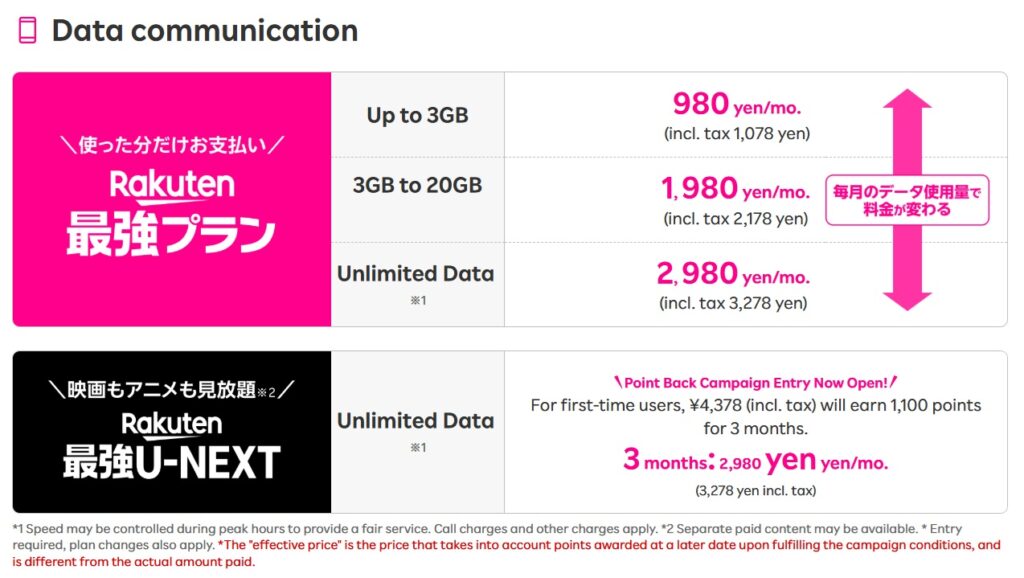
Rakuten Mobile is designed around a single core plan—the “Rakuten SAIKYO Plan”—with monthly fees determined in tiers based on how much data you use each month. For example, some months you might barely use data because you’re on Wi‑Fi most of the time, while other months you might use more data for maps and videos while traveling. Even with those month-to-month swings, the easy-to-grasp point is that your bill moves in line with your usage. Also, because there’s a general upper limit to what you’ll pay even if you use a lot, it’s reassuring that costs are less likely to spiral upward without end.
Details of Rakuten SAIKYO Plan and Rakuten SAIKYO U-NEXT
Easy to see your data usage, making your bill easier to anticipate
If you don’t know “How many more GB until the price changes?”, it’s natural to feel uneasy. With Rakuten Mobile, you can check your usage status in the app and use the service while keeping an eye on it, which makes it easier to forecast your charges. Another plus is that you don’t need to load up on lots of add-ons from the start—you can begin with the basics and adjust later as needed, making it a good fit for people who want to get started simply.
Calls and procedures also reinforce that “easy-to-understand” experience
For domestic calls, using the Rakuten Link app can help reduce call charges, keeping call-cost management simple (eligibility and conditions apply). Applications are also easy to complete online, and if you have an eSIM-compatible device, you may be able to start without waiting for a SIM delivery. Number transfers (MNP) may, depending on your situation, support procedures that don’t require obtaining an MNP reservation number—an advantage that makes the process easier to follow even for first-time switchers.
Unlimited Domestic Calls Rakuten Link
Rakuten Mobile stands out for its simple pricing structure centered around a single plan, making it easy to use without overdoing it by matching your monthly data usage. For peace of mind, it’s a good idea to get started while checking whether it fits your needs and keeping an eye on your usage in the app (since prices and terms may change, please check the official website for the latest information).
Related Articles

Comprehensive Guide on Rakuten Mobile’s Contract Period and Cancellation Fees

How to Cancel Your Rakuten Membership: A Simple Step-by-Step Guide

Rakuten Mobile eSIM Guide | Comprehensive Explanation of Setup, Benefits, and Compatible Devices

Easy for Everyone! How to Cancel Rakuten Mobile

How to Switch from Physical SIM to eSIM for Free