Every time I see the news about earthquakes or disasters, I feel a growing sense of urgency.
“What if the network goes down right here, right now?”
“Would I be able to reach my family in an emergency…?”
As an employee at Rakuten Group, I am involved with communication infrastructure every day, so I’ve seen firsthand how technology evolves and how the network coverage expands. However, when I step away from work, I am just a person living my daily life. The anxiety of “what if” is something that hits home for all of us.
Communication is not just a convenient tool. In a crisis, it is a thin but vital “thread of life” that connects us to our loved ones and confirms their safety. In this article, I’d like to share Rakuten Mobile’s efforts toward disaster resilience and how I, as a smartphone user, am preparing for the unexpected.

1. Rakuten Mobile’s Disaster Resilience Efforts
Over the past few years, I have seen the company work tirelessly to expand coverage and strengthen infrastructure reliability. The progress has been truly remarkable.
From the introduction of the “Platinum Band” (700MHz) to reinforcing power backups at base stations, and the “Mutual Roaming” partnership with other carriers announced in March 2026—these are not just technical specifications. The mutual roaming initiative demonstrates a powerful commitment: acknowledging the limitations of working alone and joining forces with others to ensure that communication is never completely severed.
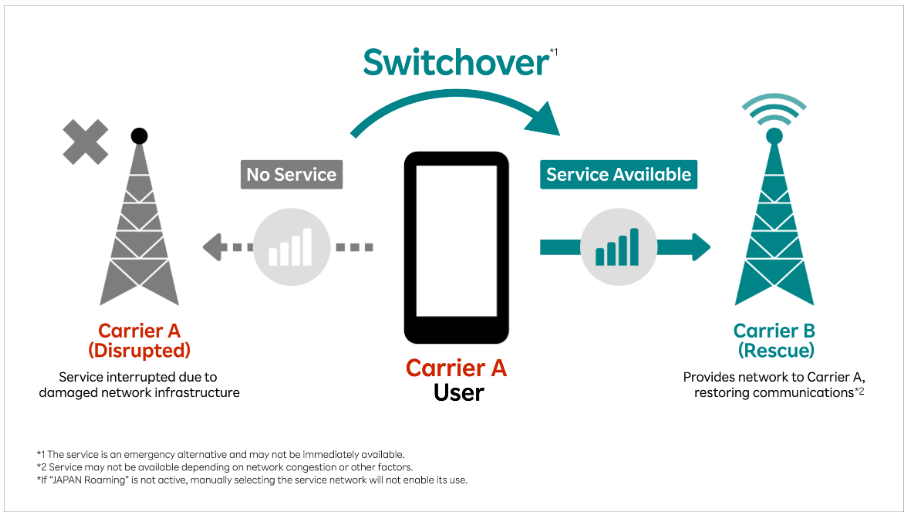
💡 Note: In the event of a disaster, your phone might sometimes show “No Service.” To prepare for such moments, a new system has been launched allowing temporary access to other carriers’ networks. This means you may be able to reach emergency services like 110 (Police) or 119 (Ambulance). You don’t need to think about this in your daily life, but knowing it exists can provide peace of mind if the worst happens.
If you watch the videos on our official disaster prevention website showing our teams working tirelessly on the ground to protect base stations, I’m sure you’ll feel, as I do—both as a colleague and as a user—a sense of relief knowing how much effort is being put into keeping us connected.


2. What you can do today to protect your “thread of life”
Here are some simple steps you can take today, while you have a stable internet connection.
Install Disaster Prevention Apps
Apps like “Yahoo! Disaster Prevention” and “NHK” are essential. Just having them installed helps you feel prepared.
Save and Manage “Offline Maps” on Google Maps
This is a game-changer. Even in the mountains with zero signal, as long as you have GPS, Google Maps can show you exactly where you are. Operation is simple:
- Open Google Maps, tap your icon in the top right, and select “Offline maps.”
- Tap “Select your own map,” and frame your home, workplace, or evacuation site.
- Tap “Download.”
Once saved, it will show your location and roads even without a signal. Try putting your phone in Airplane Mode and see for yourself—it’s quite impressive! Note: Maps are only valid within the downloaded area, so it’s best to save a wide area.
[How to delete or update maps]
If you need to free up space or update old maps, you can manage them easily in the same menu:
・To delete: Tap the “…” icon next to the saved map and select “Delete.”
・To update: Tap “Update” from the same menu to get the latest data. I recommend updating them via Wi-Fi about every six months.
For International Residents in Japan
If you are living in Japan, information is your most valuable asset during a disaster. Please prepare these today:
- “NHK WORLD-JAPAN” App: Delivers disaster information in your native language as quickly as possible.
- “Safety Tips” App: Supervised by the Japan Tourism Agency, this app provides push notifications for earthquake and tsunami warnings in multiple languages and explains evacuation procedures with illustrations.
- Prepare a “Point-and-Speak” Cheat Sheet: Save phrases like “Where is the evacuation center? (Hinanbasho wa dokodesuka?)” in your phone’s memo app so you can communicate smoothly with those around you.
Check your Evacuation Route
Do you know where the nearest evacuation center is? Use the “Hazard Map Portal Site” to check if your area is at risk for flooding or landslides. I highly recommend taking a walk to your nearest evacuation center to familiarize yourself with the path.

3. The “Sub-line” Habit: A New Way to Prepare
Because I trust in Rakuten Mobile’s evolution, I also believe in not being over-reliant on just one thing. Just as we stockpile water and food, I now “stockpile” communication by keeping a sub-line with another carrier.
Some people ask, “Why have multiple lines?” The reason is simple: I want more options in an emergency. And no, it’s not because I lack confidence in Rakuten Mobile! (Haha)
- Risk Management: In a disaster, you never know what might happen. Having a backup plan ensures that if one fails, the other might still work.
- Learning Opportunity: Using different services helps you understand how communication works and the strengths of each provider.
Keeping a sub-line as a backup while enjoying Rakuten Mobile as my main line—this “dual-wielding” style gives me the most peace of mind.
Final Thoughts: It doesn’t have to be perfect—just start somewhere.
Whether as a member of the Rakuten team or as a fellow smartphone user, my message is simple: treat communication as a vital lifeline. While enjoying the continuous evolution of Rakuten Mobile, consider keeping a sub-line as a smart backup. Why not add these “communication preparations” to your disaster kit?
I hope this helps you sleep a little more soundly tonight.

Reference Materials
- Rakuten Mobile: Disaster Preparedness Initiatives (March 2026)
- Rakuten Mobile: Disaster Countermeasures (BCP Site)
- Ministry of Internal Affairs and Communications: Ensuring Communication in Disasters
- Hazard Map Portal Site
- Tokyo Fire Department: Disaster Prevention Handbook
※Communication quality, service areas, and disaster response policies are subject to change. Please check the official information from each carrier for the latest details.
Appendix: Survival Checklist for International Residents
I’ve shared this list with my international colleagues living alone in Japan. Please take a look!
[Online: Information & Communication]
- [ ] Installed disaster apps (NHK WORLD-JAPAN / Safety Tips)?
- [ ] Saved “Offline Maps” on Google Maps?
- [ ] Following your local municipality’s SNS accounts?
- [ ] Written emergency contacts on a “paper memo” in your wallet?
- [ ] Do you have a radio? (e.g., AFN Tokyo)
[Offline: Survival Basics]
- [ ] Water (3L per person/day for 3 days) and non-perishable food?
- [ ] Portable toilet kit?
- [ ] Cash (including coins)? (Electronic money won’t work during power outages)
- [ ] Mobile battery fully charged?
- [ ] Passport copy and insurance card in a waterproof bag?
- [ ] (If living near the sea) Have you decided where to evacuate if a tsunami hits?
Related Articles

Comprehensive Guide on Rakuten Mobile’s Contract Period and Cancellation Fees

How to Cancel Your Rakuten Membership: A Simple Step-by-Step Guide

Rakuten Mobile eSIM Guide | Comprehensive Explanation of Setup, Benefits, and Compatible Devices

Easy for Everyone! How to Cancel Rakuten Mobile

How to Switch from Physical SIM to eSIM for Free